Private betaArgus, the watchman of a hundred eyes.
Track every opportunity worth chasing.
Argus captures the jobs, scholarships and programmes you are after, holds every
deadline, tailors your CV to each advert, and leaves the finished email in your Drafts.
You press send. It all runs on your own computer.
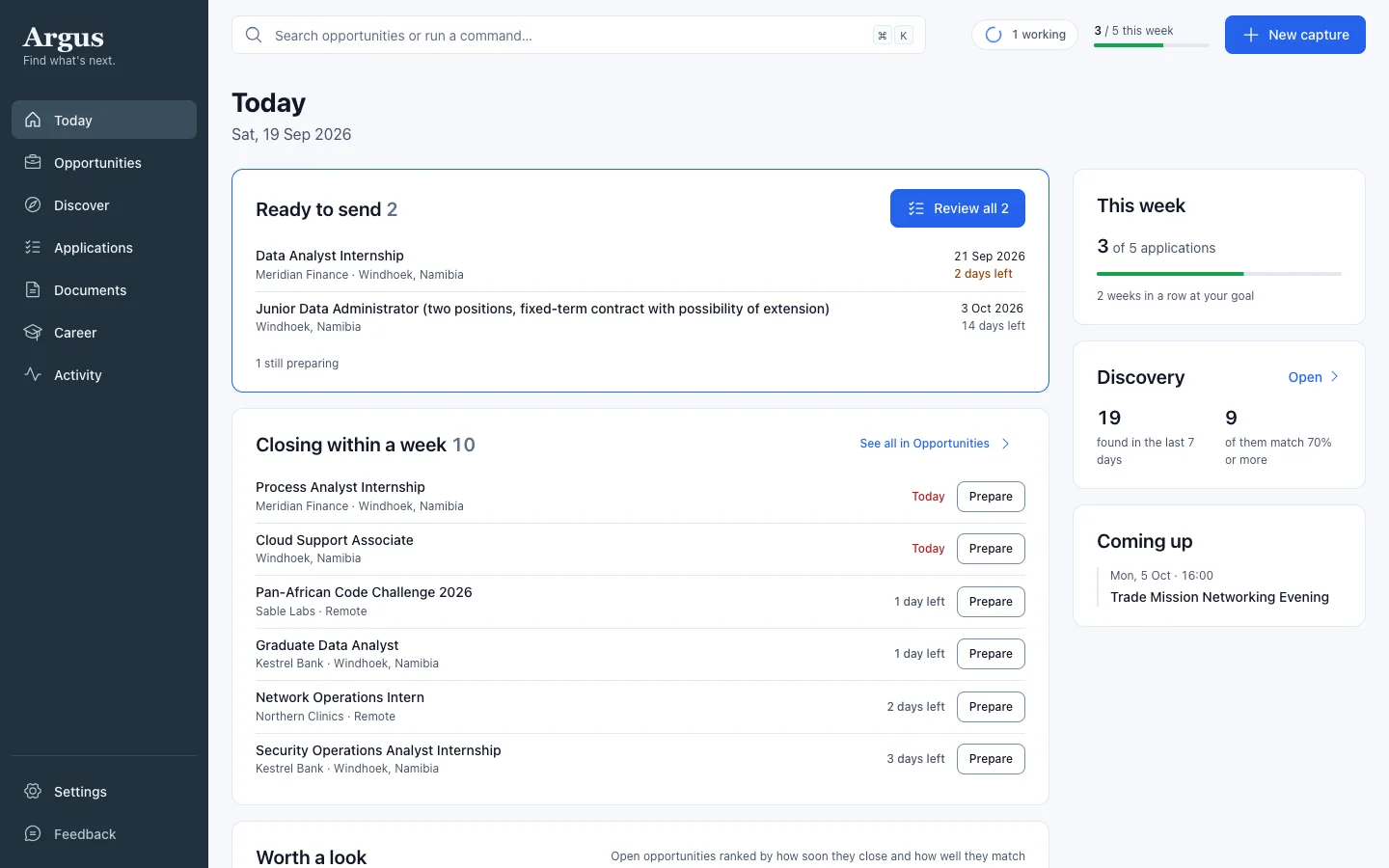
Today — what is ready to send, and what closes this week.
The problem
A job search is a hundred small deadlines.
Forty tabs. A notes app you stopped updating in March. A spreadsheet with columns
you never filled in. The closing date you found the day after it closed.
Argus does the watching and the remembering, so your time goes on applying.
One list
Everything you’re chasing, in one place.
A list you tick through, with the closing date and how well each one matches you.
Filter it, sort it, or look at the same thing as a board or a calendar.
Nothing you are chasing lives in a browser tab any more.
Applying
Prepare them all at once. Review each one. Send them yourself.
Tick the opportunities worth applying for and choose Prepare. Argus writes each
email, tailors the CV, drafts the letter and gathers the attachments — in the
background, all of them together.
Applications then walks you through them one at a time, with J and K to move between.
Anything that needs your judgement is listed at the top before you get to the send button.
Nothing is sent, and nothing is marked applied, until you say so.
One review, then done
The email, the CV and the attachments, ready to check.
Argus puts the finished email in your Drafts folder, with the right CV and the
documents the advert asked for already attached. Or it opens it in Mail, or saves it
as a file.
Argus never sends anything. That part stays yours.
Your CV
Tailored to the advert. Still written by you.
Argus suggests what to reword, what to lead with and what to leave out — using only
what your CV and your career memory already say. Safe suggestions can be accepted together.
Anything that would claim something you haven’t shown is flagged for you to read first.
Upload a Word file and your fonts, bold, bullets, columns and layout all survive. Edit any
line right where it sits.
Nothing changes in your CV until you accept it.
Discovery
New openings, found while you get on with things.
Argus checks your sources daily, scores each find against your CV, and puts the ones worth
your time in the inbox. What it set aside stays visible, so you can disagree with it.
It reads the poster attached to a post, and follows “full details on our
website” to the actual vacancy.
Career memory
It remembers, so you stop retyping.
One record of your jobs, qualifications, certificates, skills and the answers you have
given on forms before — filled in from your own CVs.
Tell it news in plain words — “I passed Security+ in August” — and
it files it in the right place.
Every letter and every form answer comes from here.
And the rest of it
The small things that keep it moving.
Capture in seconds
Paste a link, drop a screenshot, or photograph a poster. Argus reads the details and files them with the deadline.
Never miss a deadline
Reminders, a daily digest and a weekly goal keep you moving before things close.
Forms, filled
Argus answers application forms from your memory — in its own window, from your browser, or from a page you paste in. What it can’t know for sure, it leaves for you.
Send it from your phone
Share a link or a poster from your phone and it is waiting when you get back — even with your laptop asleep.
Your choice of AI
Pick a cloud model or one running on your own computer, separately for each thing Argus does.
A record of everything
Activity lists every capture, stage change, prepared application and reply, day by day.
How it works
Up and running in five minutes.
01
Get an invite
Argus is invite-only for now. Request one and a personal code is on its way.
02
Install and set up
Download for Mac or Windows, enter your code, and hand it your CV. It reads your career out of it.
03
Start applying
Add opportunities as you find them, let discovery bring you more, and prepare a batch whenever you have an hour.
Your search stays yours. Argus runs on your own computer, and there is no server
of ours holding what you track.
Your CVs are encrypted on disk. Your keys live in your operating system’s
keychain, not in a settings file.
Cloud AI is the one thing that leaves: when you point Argus at Gemini or
Claude, your CV and the advert go to them under your own API key and your own account.
If you would rather no outside company ever saw your CV, point Argus at a model running on
your own machine instead — separately for each thing it does.
During the beta it also sends anonymous usage counts so it can be improved,
and never the contents of anything you track. Captures sent from your phone wait on our
backend as ciphertext we have no key for.
Not sure which Mac? Apple menu → About This Mac. “Apple M-series” chip → Apple Silicon; “Intel” → Intel.
Your computer will warn you the first time. Here is how to open it anyway.
Argus is not code-signed. An Apple Developer ID costs $99 a year and this is a
one-person project without a budget, so macOS and Windows both treat the app as coming
from an unidentified developer. Nothing is wrong with the download — but it does mean
your operating system is not vouching for it, so only ever take it from this page.
On a Mac. Open Applications, right-click Argus and choose Open — not a
double-click, which gives you no way through. Then click Open again. If the menu offers
no Open, go to System Settings → Privacy & Security, scroll down, and click
Open Anyway next to the message about Argus.
On Windows. Unzip the download, then run Setup.exe. When the blue
SmartScreen panel appears, click More info and then Run anyway.
Why a zip on Windows? Chrome blocks unsigned .exe downloads
outright as “virus detected”. The zip is how the installer reaches you at all.
Both warnings stop once the builds are signed — see the
beta terms.